Hand-Drawn, Scroll-Animated Diagrams for a Blog with Rough.js
29 Oct 2026 · 7 min read
Most blog diagrams look like they came out of the same tool, because they did. Grey boxes, straight arrows, a default font. They’re clear enough, but they read as filler, and next to a hand-drawn cover image they clash.
This site’s covers are ink sketches from an engineer’s field notebook: black fine-liner, cross-hatching, warm paper and exactly one pink accent. I wanted the diagrams inside posts to belong to the same notebook, and to draw themselves in as you reach them.
The short answer: generate the SVGs once at build time with Rough.js, ship them as plain <img> tags, swap them for inline <svg> on the post page, and animate stroke-dashoffset against the scroll position. No drawing library reaches the browser, and every diagram still works as a static image anywhere else.
Why sketchy diagrams earn their place
Rough.js describes itself as a library for graphics with “a hand-drawn, sketchy, appearance”, and at under 9 kB gzipped it’s small. Its author, Preet Shihn, has written up the algorithms: each line gets randomised end points and a bowed curve through two offset points, and it’s drawn twice, the way a hand goes over a line.
That wobble does two jobs. It matches the covers, so a post reads as one piece rather than an illustration plus a slide deck. And it signals, honestly, that the diagram is an explanation rather than a spec. Nobody reads a sketch as “the architecture, to scale”.
Existing write-ups, like José Pérez’s tour of Rough.js, cover the look well. They stop at a static drawing. The rest of this post is the part I couldn’t find written down.
A diagram in the same hand as the cover reads as part of the argument, not a decoration bolted on.
Generate the SVG once, at build time
Rough.js has two modes. The canvas and SVG helpers draw straight into the page. The generator returns the instructions instead, and toPaths() turns them into SVG path data. That second mode runs happily in Node, so the library never needs to ship to readers.
All the diagrams on this site come from one script, scripts/sketches.mjs. Stripped to its core:
import { writeFileSync } from 'node:fs';
import rough from 'roughjs/bundled/rough.cjs.js';

const gen = rough.generator({ options: { seed: 7, roughness: 1.3, bowing: 1.2 } });
const parts = [];

for (const p of gen.toPaths(gen.rectangle(20, 20, 160, 70, { strokeWidth: 1.6 }))) {
  parts.push(`<path d="${p.d}" pathLength="1" stroke="currentColor" stroke-width="${p.strokeWidth}" fill="none"/>`);
}

writeFileSync('box.svg', `<svg xmlns="http://www.w3.org/2000/svg" viewBox="0 0 200 110" role="img" aria-label="A box" stroke-linecap="round">${parts.join('')}</svg>`);
Three details in there matter more than they look.
- A fixed
seed. The Rough.js docs describe it as a way to get “the exact shape when re-generating with the same parameters”. Without it, every run redraws every line slightly differently and every diagram shows as changed in the pull request. stroke="currentColor". The ink takes its colour from CSS, so one file works in light and dark mode once it’s inline.pathLength="1". This tells the browser to treat the path as one unit long for dash calculations (MDN onpathLength). It’s what makes the animation later a one-liner, with no measuring of path lengths in JavaScript.
The real script wraps this in a handful of helpers (box, arrow, curveArrow, hatch, circle, text) so a diagram reads like a short list of drawing calls. Adding one means writing a function, running node scripts/sketches.mjs, and committing the SVG it writes to public/sketches/. Each diagram on the site is somewhere between 11 and 53 paths.
Treat Rough.js as a build tool, not a runtime dependency: the reader downloads ink, not the pen.
Ship an <img>, upgrade to inline <svg>
A post includes a diagram as an ordinary figure:
<figure data-sketch="routing-tax" class="sketch-figure">
  <img src="/sketches/routing-tax.svg" alt="…" width="820" height="300">
  <figcaption>Fig. 1 · The routing tax</figcaption>
</figure>
That’s the version RSS readers, cross-posted copies and anyone without JavaScript get. It has alt text, fixed dimensions so nothing jumps, and it looks right. The one thing it can’t do is follow the theme: an SVG loaded as an image can’t see the page’s CSS, so currentColor stays black. In dark mode the stylesheet applies filter: invert(0.85) to the image as a fallback.
On the post page, a few lines upgrade it:
for (const figure of document.querySelectorAll('figure[data-sketch]')) {
  const img = figure.querySelector('img');
  if (!img) continue;
  fetch(img.src)
    .then((res) => res.text())
    .then((svg) => img.replaceWith(document.createRange().createContextualFragment(svg)));
}
The fetch usually costs nothing, because the browser already has the file from loading the image. Once the SVG is inline, its paths are part of the document, so CSS can colour them, restyle the accent for dark mode and animate them. The aria-label on the <svg> carries the same description as the image’s alt.
One caution: createContextualFragment parses whatever it’s given as markup. That’s fine for files my own build script wrote and serves from the same origin. Point it at anything else and you’ve built an injection hole.
Progressive enhancement here is literal: the image is the product, and the inline SVG is a bonus for browsers that run the script.
Draw the ink in as the reader scrolls
With pathLength="1" on every path, the draw-in effect is a dash exactly as long as the path, offset by its full length, then slid back to zero. The idea for this came from the usual recipe of an IntersectionObserver adding a class. What shipped needs no JavaScript at all, because CSS scroll-driven animations can tie a keyframe to the element’s position in the viewport:
@keyframes draw {
  to { stroke-dashoffset: 0; }
}

@supports (animation-timeline: view()) {
  .sketch-figure path {
    stroke-dasharray: 1;
    stroke-dashoffset: 1;
    animation: draw linear both;
    animation-timeline: view();
    animation-range: entry 10% cover 45%;
  }
}
The animation-range means the ink starts once the figure is 10% of the way into view and finishes by the time it’s 45% through. Because it’s tied to scroll rather than time, it’s scrubbable: scroll back up and the ink un-draws, so the page feels like it’s being sketched as you read.
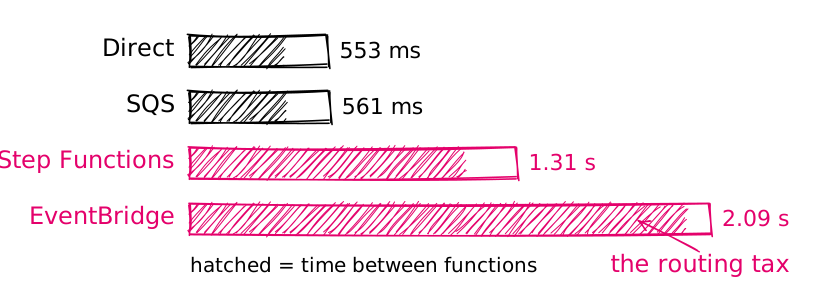
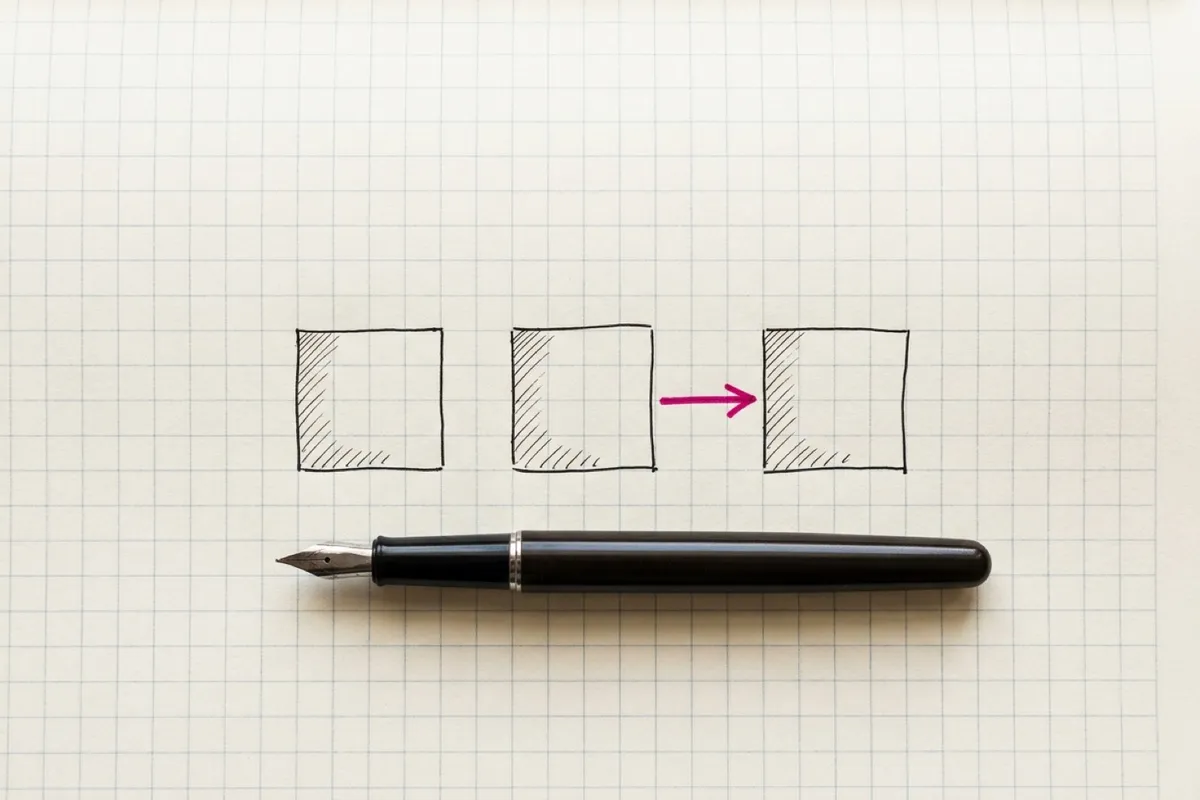
That’s the diagram from my Lambda orchestration benchmarks post. The labels are <text> elements, not paths, so they’re there from the start while the lines arrive around them.
Two guards keep this from going wrong:
@supports. Scroll-driven animations shipped in Chrome 115 and have since reached Safari, but MDN still listsanimation-timelineas not Baseline (check Can I use for today’s picture). Wrapping the rules means a browser without support never sets the dash, so it shows the finished drawing rather than a blank box.- Reduced motion. The site’s
prefers-reduced-motion: reduceblock turns off every animation and forcesstroke-dashoffset: 0on sketch paths, so those readers get the finished ink immediately.
If you need the effect in browsers without scroll timelines, or you’d rather it played once than scrubbed, the observer version is a short step from here:
const io = new IntersectionObserver((entries) => {
  for (const e of entries) {
    if (!e.isIntersecting) continue;
    e.target.classList.add('drawn');
    io.unobserve(e.target);
  }
}, { threshold: 0.3 });
document.querySelectorAll('.sketch-figure').forEach((f) => io.observe(f));
Pair it with .sketch-figure path { stroke-dasharray: 1; stroke-dashoffset: 1 } and .sketch-figure.drawn path { animation: draw 1.2s ease forwards }. Because the paths only exist after the inline swap, the hidden starting state can never strand a no-JavaScript reader with an empty figure.
pathLength="1" turns a fiddly measuring job into two CSS declarations.
One notebook, one pen, one pink
The animation is the fun part, but the consistency is what makes it work. Every diagram on the site follows the same rules as the covers:
- One ink. Everything is
currentColor, stone-800 in light mode and stone-300 in dark. - One accent. A single constant,
#e4016b, the same magenta as the covers, applied through anaccentclass so dark mode can swap in a lighter shade. It goes on the one thing the diagram is about, like the two slow rows in the figure above, and nowhere else. - One hand. Labels use the same handwriting face as the margin notes, with
'Segoe Print','Bradley Hand'andcursiveas fallbacks in the SVG itself, since an image can’t load the page’s web fonts. - One set of settings. Roughness, bowing, stroke widths and hachure gaps live in the helpers, not in each diagram, so a new sketch can’t drift from the others.
Keeping all of that in one script means a new diagram inherits the house style by default. I don’t have to remember it; I’d have to work to break it.
Put the design language in the helper functions, and every new diagram follows it for free.
If you’re building your own
- Generate at build time. Use the Rough.js generator and
toPaths()in a Node script, and commit the SVG output rather than shipping the library. - Fix the seed. Deterministic wobble keeps diffs clean and diagrams stable between builds.
- Ship an image first. An
<img>with alt text and dimensions works everywhere; upgrade to inline SVG only where your script runs, and only for files you generated. - Set
pathLength="1". Then the draw-in isstroke-dasharray: 1and an animated offset, with no length measuring. - Guard the animation. Wrap it in
@supports, respectprefers-reduced-motion, and make sure the fallback state is the finished drawing. - Encode the style, don’t describe it. One ink, one accent colour and shared helpers do more for consistency than a style guide anyone has to read.