One Inbox for Everything Your Agents Need From You
6 Oct 2026 · 5 min read

Count the places you check before lunch. The ticket board. Pull requests. A few terminal panes with agents running in them. An inbox. An error tracker.
Once you start working with more than one or two AI agents, this is where you end up. Agents are good at the legwork: triaging tickets, drafting fixes, investigating errors, improving pages. But every one of them eventually stops and waits for a decision, and each one waits somewhere different.
Sound familiar? The work hasn’t disappeared. It’s turned into finding out what the work is waiting on.
This is the first post in a series about a method I’ve been refining for working with AI agents. It has one rule: there is one place that tells you what needs you, and everything else runs on its own.
Step one: audit the agents
Before adding anything, ask a blunt question of every agent you run: what has it actually shipped? Not what it can do. What made it into the product.
Your version control history answers this quickly, and the answers are rarely even:
- Usually one agent does most of the useful work. It turns well-defined tickets into reviewed pull requests.
- A triage agent earns its keep by saying no. Filtering out duplicates, already-built requests and things that aren’t code at all saves more of your time than any code it could write.
- Some agents are busy but not useful. An agent that fixes every warning in your error tracker will open plenty of PRs, and a good share of them will be noise.
- Some agents achieve nothing. They run, they log, they never ship.
That last group is the most important finding. An agent that runs quietly and ships nothing still costs you: attention, tokens, and a pane you glance at every morning. Cut it.
Look for overlap too. If two agents do the same job in different places, that’s two things to watch. Keep the one that puts you in the loop at the moments that matter.
Judge agents by what they ship, not by what they do.
Step two: give every agent a diary
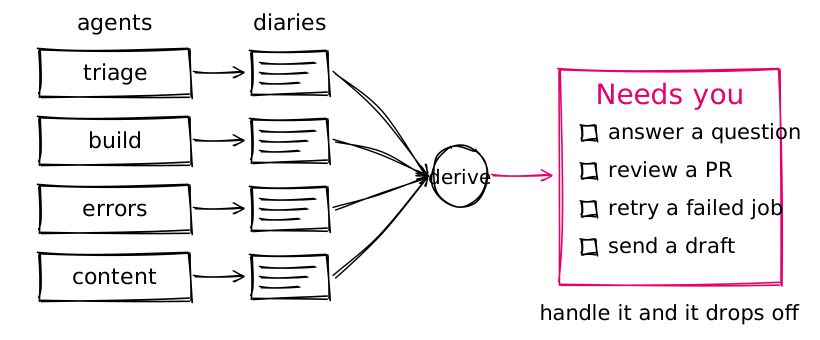
Each agent appends one line of JSON to its own log file whenever it does something worth knowing about: it opened a PR, it got stuck, it drafted something, it has a question.
recordAgent('seo', {
  id: 'seo-pricing-page',
  name: 'SEO — /pricing',
  outcome: 'needs-work',
  needs: 'Answer the question below',
  ask: 'The page cites last year’s figures. Which source should the new copy use?',
});That’s all. No queue, no database, no message bus. Append-only files are easy to read, easy to debug, and they survive every restart.
Step three: derive the inbox, don’t store it
“Needs you” shouldn’t be a list anyone maintains. Calculate it from the diaries: the newest entry for each item that still waits on a person. That means:
- a question nobody has answered
- a pull request that’s still open
- a job that failed and hasn’t been dismissed
- a reply that’s drafted but not sent
Merge the PR and it drops off. Answer the question and it drops off. There’s nothing to tidy up, because nothing is stored to go stale.
Step four: agents propose, people decide
Agents can do the legwork, but some actions should only ever happen on a human click:
- Nothing leaves the building without a person. Messages send when someone presses Send. Deploys start from a button, and that button can only reach the environment it’s meant for.
- Agents ask rather than guess. When an agent gets stuck, it shouldn’t hand you a stack trace. It should ask one plain question you can answer in a sentence, and the next attempt should use your answer.
- Text from outside gets no tools. Anything written by someone outside the team is drafted by a model call that can’t run commands, read files or reach other services. More on why in a later post: it’s easier to get wrong than you’d think.
What it looks like day to day
One page. The left column is Needs you: a triage question, a couple of drafted replies waiting for review, an agent asking which source to cite, a PR ready to merge. The right column is Next up: the backlog, split into bugs and features, with anything urgent pinned to the top.
- Before: half a dozen places to check, and a nagging feeling something was missed.
- After: one page, and a notification when something new lands in it.
The backlog gets the same treatment. A long ready-for-dev column with no obvious answer to “what next?” becomes a ranked list: urgent fixes, then priority, then bugs before features, then how many people asked, then age. A sweep agent reads the whole backlog and suggests which tickets to build together, which look like duplicates, and which have probably been built already. It suggests; nothing changes until a person says so.
If you’re building your own
- Audit before you automate more. Count what each agent has shipped. Cut the ones that haven’t.
- Make “needs me” a query, not a list. Derive it from what the agents record, and it can’t go stale.
- Put people at the gates, not in the middle. Don’t watch agents work. Answer their questions, pick between options, and approve anything that leaves the building.
- Keep it boring. A small server, some JSON files and one page have been more reliable than anything clever.
Coming up in this series
- One inbox for everything your agents need from you (this post)
- From idea to pull request with human gates, and a fast lane for bugs
- Agents that earn their place: triage, SEO and error tracking
- Drafted replies without living in the inbox: “ask and redraft”, and closing the loop
- Treat outside text as hostile: why “no working folder” isn’t a sandbox
- Shipping safely: an environment-locked deploy button, and a debugger that fast-tracks urgent fixes
- What broke, and what I’d do differently
The agents are rarely the bottleneck. Knowing what they need from you is.